Charging Station Locator
- 2.8
- Rating
- 10.00K
- Installs
- Free
- Price
 Analysis by App-foxy
Finding a public charger is easy only when the route, the car, and the information all cooperate. In real life, I may be driving through an unfamiliar town, trying to interpret a map in bright sunlight, or planning a stop for someone who needs a little more time and predictability. Charging Station Locator, developed by POSITIVE INFINITY, is built around that practical problem: locating charging points nearby or elsewhere in the world. I tested it as an Auto & Vehicles app, and my overall impression is that it is a focused starting point rather than a complete travel companion.
The app is free to install and aimed at everyone, which makes it approachable for casual drivers as well as electric-vehicle owners who only need a charger occasionally. It has passed the ten-thousand-install mark, but its average rating is 2.8, so I would not approach it expecting a universally polished experience. My experience was more useful when I treated it as one source of location information and kept a backup plan ready. That distinction matters especially for drivers who cannot easily make an unnecessary detour.
How clearly the map supports different users
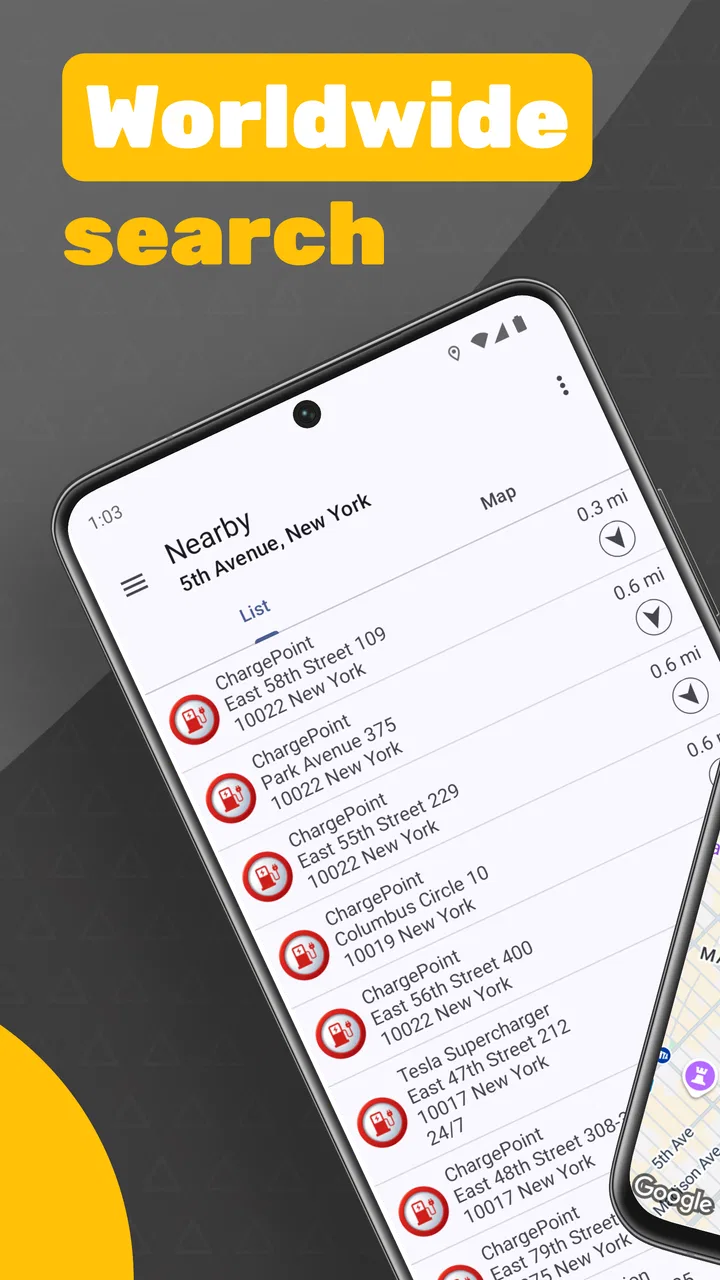
The first thing I look for in a locator app is whether I can understand the screen quickly without studying it while moving. This app’s purpose is narrow, which is helpful: I am not dealing with fuel prices, vehicle maintenance tools, or a large collection of unrelated services. The central task is to find charging stations, either close to my current situation or in another place I am preparing to visit.
You May Also Like

 Google Keep - Notes and lists
Google Keep’s Quiet Growth Shows the Appeal of Simpler Notes
As mobile work gets busier, Google Keep keeps winning a simple contest: capture a thought quickly, find it later, and get on with the day.

 Blood Strike: 2.5 Anniversary
Blood Strike’s Loadouts Turn Every Drop Into a Tactical Gamble
A close look at Blood Strike’s custom loadouts: how fast access to signature weapons reshapes its battle royale rhythm, rewards preparation, and narrows the gap between fights.

 Pandora - Music & Podcasts
Pandora’s Music Is Easy to Start, but Harder to Recover
Pandora’s strength is its low-effort path from a seed to a station. Its weak spot is how much confidence it asks you to place in connection, setup, and quiet recovery.

 8 Ball Pool
8 Ball Pool Is Built on Rivalries, Rematches, and Routine
A close look at the rivalries, rematches, shared routines, and unanswered safety questions that turn a quick pool match into a persistent mobile community.

 Samsung Music
Samsung Music’s Quiet Strength Is Playing What You Already Own
Its reach comes less from spectacle than from dependable access to a personal library. That simplicity is both the app’s strongest retention engine and its ceiling.

 AccuWeather: Weather Radar
AccuWeather Review: A Quick, Clear Forecast for Everyday Decisions
For everyday plans, the best forecast is the one you can understand quickly. AccuWeather makes rain timing, radar, and local conditions easy to act on, with a few trade-offs.
More From Our News Desk



That simplicity can support people who prefer a short, direct workflow. A driver who already knows the destination can search around it before leaving, while someone on an unfamiliar route can begin with nearby locations. In my view, the best use is to check the map before starting the journey, when I have time to compare possible stops rather than trying to make decisions under pressure.
Readability is not only about the size of text. It is also about how much information appears at once and whether map symbols are easy to distinguish. Charging maps can become visually busy, particularly in dense urban areas. I found it more comfortable to pause and inspect the map than to rely on a quick glance. If you have reduced vision, difficulty distinguishing small icons, or trouble processing crowded screens, this app may require more preparation than a platform with stronger filtering and clearer station details.
One useful habit is to search a little wider than the exact point where you expect to stop. A charger just outside a town may be more practical than several markers clustered in the center, especially if parking, traffic, or road crossings make the central area awkward. I also recommend checking the result from more than one zoom level. A close view helps identify the location, while a wider view shows whether there are alternatives nearby.
For users who rely on large text or display magnification, the practical question is whether the map remains understandable after the phone enlarges interface elements. I would test that at home before depending on it during a trip. Enlarging the display can make labels easier to read, but it can also reduce the amount of map visible at once. That trade-off means planning two or three possible charging areas in advance is safer than searching only when the battery is already low.
Navigation that works best before the journey
I would not treat the app as a full turn-by-turn navigation replacement. Its value is in identifying possible charging locations, not in removing every decision that follows. Once I choose a station, I still need to consider the road approach, parking layout, opening conditions, and whether the location is actually convenient for my vehicle and passengers.
This separation is important for anyone who finds rapid decisions tiring or stressful. I can use the locator while stationary, note the most promising destination, and then use my usual navigation tool for the drive. That two-step workflow is slightly less convenient than an all-in-one service, but it is easier to manage than switching between map results while driving.
People with cognitive or attention-related needs may also benefit from reducing the task to a simple checklist: find a station, choose a backup area, confirm the route in a familiar navigation app, and only then set off. The app does not need to handle every part of the trip to be useful. It becomes less suitable when I expect one screen to provide charger compatibility, live availability, payment instructions, accessibility information, and navigation together.
Motor, sensory, and communication considerations
Using a charging locator involves more than tapping a marker. I may need to hold the phone steady, zoom the map, select a result, and read enough context to decide whether the location is worth visiting. For someone with limited dexterity, tremor, or fatigue, repeated small gestures can become frustrating. The safest approach is to search while parked and use deliberate, larger movements rather than trying to operate the app in a moving car.
Voice control or an external accessibility tool may help some users, but I would not assume that every part of the map can be controlled comfortably without touch. Map interfaces often depend on visual positioning, and a result that looks obvious to one person may be difficult to identify without sight or with limited contrast sensitivity. If you use a screen reader, I would test whether station markers and their surrounding information are announced in a useful order before relying on the app alone.
Bright daylight creates another practical issue. A phone screen can be difficult to read from a dashboard, and glare can make subtle map markers disappear. I found that checking the route before leaving was more reliable than trying to interpret the display at a roadside stop. A shaded place to park, a passenger who can inspect the map, or a preselected alternative can make a meaningful difference for users with light sensitivity or low vision.
For people with hearing loss, the app’s main task is naturally less dependent on sound than a spoken-navigation system. That is a relative strength: locating a station can be done visually without needing to hear an alert. However, the surrounding charging experience may still involve visual or audible signals from the vehicle, charger, or site. This app can help with the location decision, but it cannot by itself make the entire charging process accessible.
Users with sensory sensitivities may appreciate keeping the search short and predictable. I would avoid browsing every marker in a busy area and instead choose a quiet, familiar stopping point where possible. A station that is technically close may still be a poor choice if the surrounding environment is crowded, confusing, or difficult to leave. The map can narrow the options, but personal knowledge of the area remains important.
What the app can and cannot answer about a station
A location marker is not the same thing as a complete accessibility profile. Before I commit to a stop, I want to know whether the entrance is easy to find, whether the parking space is level, whether there is room to maneuver, and whether the charger can be reached without stepping over obstacles. I would also want information about lighting, shelter, nearby facilities, and the distance from the parking position to a safe waiting area.
Those details matter to wheelchair users, people who walk with a cane, drivers who need extra space to transfer, and anyone traveling with children or mobility equipment. A map can point me toward a charging site, but I still need another way to verify the physical layout when those factors are essential. Calling the site, checking a familiar local source, or visiting during a low-pressure trip may be wiser than assuming the nearest marker is the most usable one.
The same caution applies to charger suitability. I would confirm that the connector and charging arrangement match my vehicle before taking a long detour. I would also avoid interpreting a map marker as a promise that a charger is free, operational, reserved, or easy to access at the exact moment I arrive. This is one of the app’s biggest trade-offs: it can help me discover places, but discovery is only the first stage of a dependable charging plan.
Situational access for everyday journeys
Consider a realistic trip: I am driving to a town I do not know, traveling with a passenger who cannot stand for long, and I want to charge before the return journey. I can use the app at home to inspect the destination area, identify several possible locations, and select one that appears close to the route rather than deep inside a congested center. I would then check the approach using my usual navigation tool and keep a second location ready in case the first stop is unsuitable.
That workflow is more inclusive than simply searching when the battery warning appears. It gives me time to consider walking distance, parking space, traffic, and the needs of the person traveling with me. It also avoids forcing a passenger to wait while I make several uncertain decisions in a busy car park. The app’s strongest contribution in this situation is early planning, not emergency rescue.
It can also be useful for people who borrow or share electric vehicles. A regular owner may already know dependable charging points, but a temporary driver may not. Searching in advance helps a new driver understand the charging landscape around work, home, or a planned destination. I would still write down the chosen location or save it in my normal navigation system, because depending on memory after a quick map search is unnecessary friction.
For long-distance travel, I see the app as a scouting tool. I can search around towns along the route and compare the general distribution of charging options. I would not use it as my only source for a tightly timed trip, particularly if arriving at a working charger is critical. A better arrangement is to combine it with vehicle-specific planning, a route planner, or a service that provides more current operational information.
People who drive at night, in bad weather, or in unfamiliar areas should be especially cautious. A station that looks close on the map may be difficult to approach after dark, and a short walking distance can feel very different in rain or snow. If I am traveling alone and have limited mobility, I would favor a location I can verify beforehand, even if it is slightly farther away. Convenience on the map should not automatically outweigh confidence in the physical setting.
The app’s Everyone age rating makes it suitable as a general-purpose locator for households, but younger passengers should not be expected to manage the charging plan while the vehicle is moving. I would assign the search to a parked adult or passenger who can safely inspect the details. That is common sense, but it also highlights the difference between an accessible-looking map and a genuinely low-effort travel process.
Where the usual alternatives are stronger
The most obvious alternative is a general map application. Those tools are often better for turn-by-turn directions, business context, photos, opening information, and familiar route planning. If I already know the charging network or need a complete journey plan, a general map may be more convenient. Charging Station Locator is more appealing when I want a dedicated place-finding screen without sorting through unrelated businesses.
Vehicle-brand apps and charging-network apps can also be better for drivers who need live status, account functions, payment steps, connector information, or a record of their charging activity. Their weakness is that they may focus on one vehicle ecosystem or one network. A broad locator can be useful at the discovery stage, especially when I do not yet know which provider operates in an unfamiliar area.
That makes the app a complement rather than a universal replacement. I would use it to widen the search, then move to a more specialized source to verify the stop. This two-source approach takes extra time, but it reduces the risk of treating a simple location result as a complete operational guarantee. For a driver who wants everything handled in one place, that extra step may be enough reason to choose another app.
The purchase model is also worth considering. The app is free, while in-app purchases are listed at $1.99 per item. I would decide only after using the basic experience long enough to understand what additional value those purchases provide. A paid add-on may be reasonable if it removes a specific obstacle in my workflow, but I would not pay simply because I need more confidence about a trip unless the added function clearly supplies it.
The modest public response should encourage realistic expectations. The app has an average rating of 2.8 from around fifty ratings, with four written reviews, so there is not a large body of user feedback to establish how it behaves across every phone and travel situation. I would install it and test searches near home before depending on it during a demanding journey. That small trial costs little because the main app is free, and it reveals more than a quick glance at the description.
Remaining barriers before I would rely on it
The largest barrier is the gap between finding a point on a map and knowing whether that point will work for a particular person. Accessibility is highly physical and situational. A station may be close but still involve a steep route, narrow space, poor lighting, or an inconvenient crossing. Because those factors can determine whether a trip is possible, I would not describe the app as a complete accessibility solution.
Another barrier is the need for verification. If I am low on charge, traveling with medical equipment, or unable to make a second attempt, uncertainty becomes expensive. The app is most comfortable when I have enough range to change plans and enough time to investigate. It is less appropriate as the sole tool for a high-stakes journey.
There is also a human-factors barrier: map searching can encourage drivers to focus on the phone at the wrong moment. I would always complete the search while stopped, place the phone securely, and use a familiar navigation method afterward. Anyone who finds touch interfaces difficult should prepare destinations in advance or ask a passenger for help rather than trying to operate the app in traffic.
Finally, the app may not suit someone who needs highly structured information. If your decision depends on charger type, live availability, pricing, reservation rules, or detailed site accessibility, you will probably want a network-specific or vehicle-specific service alongside it. That is not a reason to dismiss this locator; it simply defines its role more honestly.
An inclusive verdict for practical charger searches
After using Charging Station Locator, I see a useful but limited tool for discovering charging locations. Its focused purpose makes the first search straightforward, and the ability to look near me or in another part of the world supports both spontaneous stops and advance planning. For a driver who wants a lightweight way to build a shortlist, it can earn a place on the phone.
My recommendation is strongest for people who plan before driving, keep a backup option, and are comfortable verifying important details elsewhere. It can support inclusive travel by giving me an early view of possible charging areas, but it does not replace checking the physical environment or confirming whether a station suits my vehicle and personal needs.
I would skip it as my only charging companion if I need live operational certainty, detailed accessibility information, or integrated navigation. In those cases, a vehicle or charging-network service is likely the better primary choice, with this app serving as an additional discovery tool if its map coverage proves useful.
My honest advice is to use it as the first step in a charging plan, never the entire plan. Install it, test a familiar search while parked, compare its results with a source you already trust, and judge whether the extra information fits your routine. For some drivers that modest workflow will be enough; for others, the remaining uncertainty will make a more specialized alternative worth the effort.
POSITIVE INFINITY has kept the idea easy to understand, and the free entry point lowers the risk of trying it. Still, the rating of 2.8 is a useful reminder to keep expectations measured. I would recommend it to a friend who wants a simple global charger locator and is willing to double-check the details, while I would point a time-sensitive or accessibility-critical traveler toward a more comprehensive charging service.
FAQs for Charging Station Locator
01What is Charging Station Locator, and what does it do?
Charging Station Locator is a navigation and utility app designed to help electric vehicle drivers find nearby charging stations. After opening the app, you can typically view stations on a map, search by location, and check useful details such as distance, connector types, charging speed, and availability when that information is provided. It is especially helpful when planning trips or locating a charger in an unfamiliar area.
02Does Charging Station Locator show real-time charger availability and pricing?
The availability of real-time status, pricing, and station details depends on the data sources connected to the app and the individual charging network. Some locations may display whether a connector is available, occupied, or out of service, while others may only show basic location information. Prices can also change frequently, so it is wise to confirm the final cost in the charging operator’s app or at the station before starting a session.
03Can I filter charging stations by connector type, charging speed, or network?
Most versions of Charging Station Locator provide filtering or search tools that make it easier to find a compatible charger. Depending on the platform and available station data, you may be able to select connector standards, fast or rapid charging, supported networks, operating status, or amenities nearby. These filters are useful because not every charging point is compatible with every electric vehicle, and some stations may require a specific membership or payment method.
04Does Charging Station Locator work offline or require an internet connection?
An internet connection is generally recommended because the app needs current map data, station updates, route information, and sometimes live availability details. Basic map information may remain visible temporarily through cached data, but offline functionality can be limited and should not be relied upon for a long journey. Before traveling through an area with weak coverage, it is sensible to review your route and save important station information in advance.
05Is Charging Station Locator free to download, and are there any additional costs?
Charging Station Locator may be available as a free download, but the exact pricing model can vary between Android and iOS versions. Some features may be supported by advertising, optional in-app purchases, or a premium subscription. The app itself does not necessarily cover the cost of charging your vehicle; station operators may charge separately for energy, parking, connection time, or membership access. Always review the store listing and station pricing before downloading or charging.
Pros
- Finds nearby EV charging stations using your current location.
- Shows station details to help plan charging stops.
- Useful for comparing charging options while traveling.
- Simple interface makes searching quick and convenient.
- Can reduce range anxiety during long electric-vehicle trips.
Cons
- Coverage may vary depending on your country or region.
- Station information can become outdated or inaccurate.
- Some listed chargers may require separate provider apps.
- Availability status may not update in real time.
- Requires location access and may increase battery usage.

Charging Station Locator
Gallery